Loading your account… / Cargando su cuenta…
Built with a fourth-generation Oregon farm family
PickTrace vs. Farm Timecard
PickTrace describes workforce and harvest management for large-scale farms, including barcode-based Android capture. Farm Timecard is built for farm crews: piece rates, work areas, offline punches and Oregon overtime. See how each handles corrections and payroll files.
No credit card required · 30-day trial of our top plan · Cancel anytime
Book a call with ChristianCalls and setup help are in English.
PickTrace and Farm Timecard, side by side
PickTrace describes workforce and harvest management for large-scale farms, including barcode-based Android capture.
What we say about PickTrace comes from its own published pages. These are vendor descriptions, not independent test results, so check features, plans and prices with them.
Recording hours
PickTraceBarcode-based software on Android field devices.
Farm TimecardWorkers punch in on their own phone or on one shared tablet with PINs. Piece tasks carry the rate in effect each day.
Office review
PickTraceVendor describes viewing, editing and analysing field data.
Farm TimecardReview hours and piece counts together before the period closes, with dated rates and every edit kept in a history.
Getting to payroll
PickTraceConfirm the file, service and payroll responsibility for your proposed setup.
Farm TimecardDownload files for Paychex Flex, Gusto, ADP, OnPay, QuickBooks or Square Payroll, or a CSV. We do not submit anything to a provider for you.
Source reviewed 4 October 2026.
How a pay period runs
01
Plan
Schedule the crew and set the day’s work.
02
Capture
Record hours, breaks and piece work in the field.
03
Review
Check timecards and rates, then approve the pay period.
04
Prepare
Get pay details and files ready for your payroll provider.

Inside Farm Timecard
Review the record before preparing files.
This is the punch detail screen, shown with demonstration data. Open an entry to see the punch and its edit history. Nothing is overwritten, so the office can see what changed before the hours go into a payroll file.
View the larger screenshot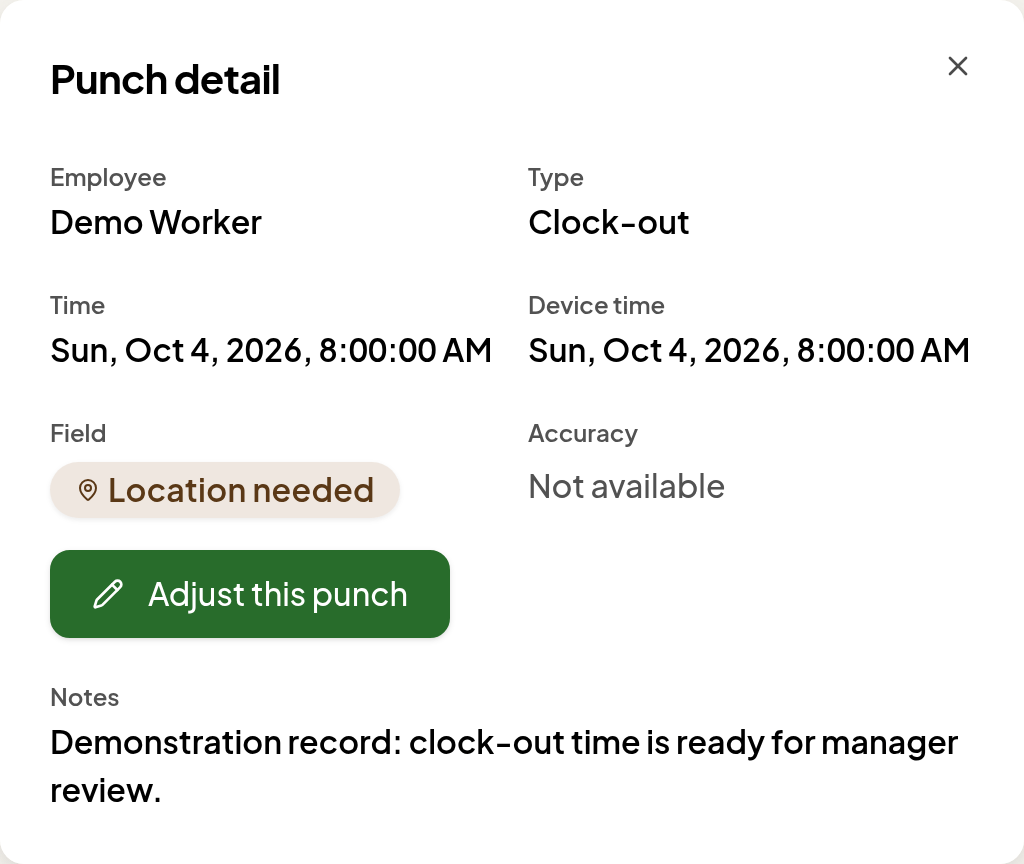
What we prepare, and what stays with your payroll team
We prepare payroll files and review summaries. Your payroll provider or payroll team handles taxes, net pay, payments and filings. Direct submission to payroll providers is unavailable. A download does not mean workers have been paid.
Which rules apply depends on the work, where it happens, the dates, your agreements and how each worker is classified. A farm category alone does not establish a rule or exemption, and local or program conditions can add more. These pages support your preparation. They are not a compliance guarantee or legal advice.
Questions to settle before you switch
- Can each company walk you through your own crew's pay period, from punch to payroll file?
- Who checks the corrections and approves the hours?
- What file or format does your payroll provider or bookkeeper need?
Pay math you can check, line by line.
For supported pay types, we work out minimum-wage make-up pay, piece pay and the overtime rate from the hours, piece counts and dated rates you record, and show each step. Review the result before it goes into a file. When two ways of figuring a worker's pay are compared, only the one selected is paid. This page does not calculate wages for you.
Worked pay examples and the new explanation reports are still being checked, so we have not published any yet. Ask whether they are ready for your workflow before you rely on them.
Explore your state and farm activity
Choose the tools your farm needs.
Which plan fits depends on how you pay your crew: by the hour, by the piece, or under H-2A. The pricing page shows what each plan includes.
Every new farm gets 30 days of our top plan with no credit card. When it ends you keep full use for 14 more days. After that your workers keep clocking in and you can still view and export your records until you choose a plan.
Oregon farms can estimate the overtime tax credit (AEOTC) and prepare its records on the Crew and Producer plans. The Basic plan does not include AEOTC. An estimate is not a tax filing, and credit eligibility depends on your farm.
Start my free 30-day trialBook a call with ChristianCalls and setup help are in English.
No credit card required · 30-day trial of our top plan · Cancel anytime